
High School and Beyond Plan – SchooLinks
SchooLinks – High School and Beyond Plan (HSBP)
About SchooLinks and HSBP
The High School and Beyond Plan (HSBP) is a state graduation requirement designed to help students explore careers or college pathways starting in 6th grade in Seattle Public Schools. It centers on students reflecting on three guiding questions:
- Who am I?
- What can I become?
- How do I become that?
Throughout the year, students update their HSBP goals to reflect their changing interests and goals, connecting what they learn and the skills they develop to future career pathways. Students in grades 6–12 use SchooLinks to:
- Complete High School and Beyond Plan activities.
- Explore careers and interests.
- Build and update graduation plans.
- Research colleges, apprenticeships, military service, and other postsecondary pathways.
- Search for scholarships and other opportunities.
- Track college and career planning activities.
Student Access to SchooLinks
Students can access SchooLinks beginning Sept. 2.
Login instructions:
- Log in to Clever Student Portal
- Scroll to College Career Readiness.
- Favorite SchooLinks to keep it near the top of the Clever dashboard.
- Select the SchooLinks application.
Student Support
Students will receive support through:
- Classroom lessons connected to their High School and Beyond Plan
- Guidance from school counselors and staff
- Step-by-step tutorials and resources
Families will also receive information to help support students at home.
Parent/Guardian Access to SchooLinks
SchooLinks allows families to:
- View your student’s High School and Beyond Plan and progress
- Explore college and career options together
- Stay informed about important milestones and next steps
Resources for Parents/Guardians:
Login instructions:
Families can access SchooLinks beginning Sept. 2.
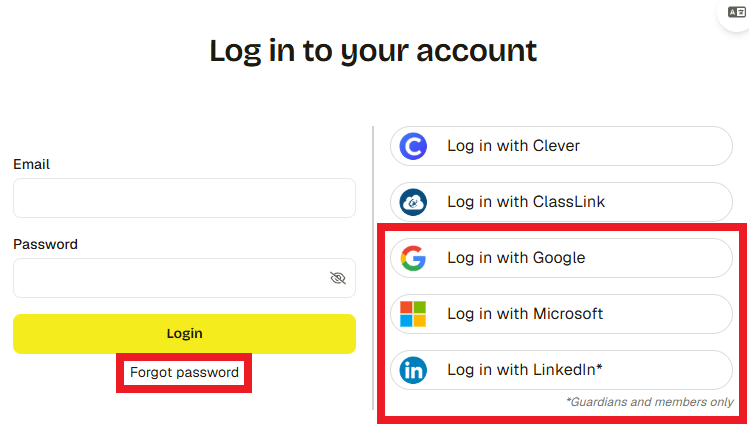
- Log in to SchooLinks using one of the options below:
- Click Login with Google, Microsoft, or LinkedIn if you have a Google, Microsoft, or LinkedIn email on file with the district.
- Click Forgot Password, enter the email you have on file with the district, then follow the email instructions to create a password.
- Once logged in, click the My students tab at the top to view your students.
- If you don’t see the right students, please reach out to the district for corrections.
- Click your student’s name to view their casefile. From the casefile you can see your student’s assessment results, review course plans, reach out to their counselor, and more!
Questions?
If you have questions, please contact the School Counseling team.